Laptop battery repair is not simply a matter of replacing a group of cells. A modern pack combines electrochemical cells with a battery-management system (BMS), protection switches, a fuel gauge, temperature sensing, and communication electronics. The pack may use SMBus or another manufacturer-specific interface to exchange information with the laptop.
That integration changes the repair problem. A pack can contain cells with usable voltage but still refuse to power the computer because its protection circuit has disconnected the output, recorded a fault, or lost required communication. Conversely, a pack that appears electrically inactive may contain damaged or dangerously over-discharged cells. Diagnosis therefore needs to separate cell condition from electronic control and communication behavior.
The procedures below are intended as a technical framework for assessment, not as a universal activation or rebuilding recipe. Laptop packs differ in cell arrangement, connector design, firmware, protection components, and service requirements. Opening or modifying a lithium-ion pack should be left to a suitably trained service provider when the construction or history is unknown.
Laptop Battery Cells, BMS Electronics, and External Connections
A laptop battery pack has two distinct but interdependent parts:
- The cell assembly: rechargeable lithium-ion cells connected in series, parallel, or a combination of both to provide the required voltage and capacity.
- The electronic management system: a fuel gauge, protection circuitry, switching devices, temperature inputs, and communication functions.
The cells store and deliver energy. The BMS monitors conditions such as pack voltage, cell-group behavior, current, temperature, and accumulated usage. Depending on its design, it can disconnect the load or charger when an unsafe condition is detected. The fuel-gauge function estimates state of charge and battery health, while the communication interface reports information to the computer.
SMBus is a common communication method used by smart batteries. A typical implementation includes clock and data connections, although some packs use a combined one-wire arrangement or another proprietary interface. Communication is not merely a convenience: the laptop may rely on battery identification, status data, temperature information, and charge permissions before it enables normal operation.
A representative multi-contact connector may include:
- Positive and negative power terminals.
- One or more thermistor or temperature-sense contacts.
- Clock and data lines for SMBus communication, or contacts for another data interface.
- Additional contacts used for identification, enable functions, or manufacturer-specific service features.
The outermost contacts are often the main power terminals, but this is not a reliable rule. Contact positions, labels, signal assignments, and the number of terminals vary between manufacturers and models. A connector that looks similar to another pack may have a different pinout. Before applying power or connecting test equipment, verify the assignment from an approved service document, a reliable schematic, or measurements made with appropriate precautions.
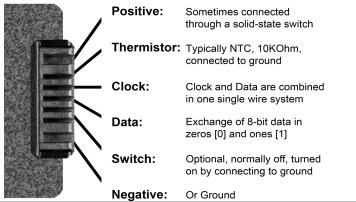
Source: Battery University

The BMS may also contain nonvolatile records. These can include cycle information, fault history, calibration data, or a permanent-failure status. Replacing cells without preserving or correctly configuring the management system can therefore leave the rebuilt pack unable to charge or communicate normally.
When a Smart Battery Pack Shows No Output
A zero-voltage reading at the external power terminals does not prove that every cell is empty. Many smart packs use an electronic switch or protection circuit that disconnects the output. The switch may open during overcurrent, overvoltage, excessive discharge, abnormal temperature, or another detected fault.
Other possible explanations include:
- Cells that have been deeply discharged.
- A failed cell group or an internal connection.
- A damaged protection circuit, fuse, or switching device.
- A recorded permanent-failure condition.
- A low-power ship or sleep state.
- A communication, identification, or authentication problem.
These conditions cannot be distinguished safely from the connector voltage alone. A pack with an open output can still contain substantial stored energy. It should be treated as live until its cell condition and energy state have been assessed by a qualified person.
Some BMS designs support low-power states intended for storage or shipment. Other designs can enter a latched fault state that requires a particular service procedure or approved diagnostic tool. The required action may depend on the battery-management IC, firmware, cell voltages, fault records, and host communication. It is not safe to assume that a procedure used on one laptop battery applies to another.
In particular, undocumented methods involving grounding a contact, bridging terminals with a resistor, applying pull-up voltage, or injecting external power can create a short circuit or defeat the very protection system intended to prevent a hazardous condition. They may also damage the BMS, overheat a cell, or cause arcing. A claim that a particular resistor value will universally keep a BMS active or clear a lockout is not a sufficient basis for working on an unidentified pack.
A non-invasive diagnostic sequence is more appropriate:
- Remove the pack from the laptop and inspect it without flexing, puncturing, or opening the case.
- Look for swelling, impact damage, corrosion, leakage, burn marks, contamination, and damaged connector insulation.
- Identify the exact model and obtain the manufacturer’s pinout and service information where available.
- Use suitable, correctly rated test equipment to verify polarity and measure only the points needed for diagnosis.
- If the pack is hot, swollen, leaking, smoking, or unstable, stop testing and move to the applicable damaged-battery response procedure.
- Refer packs requiring activation, firmware service, or fault clearing to a qualified repair facility.
A disabled output is therefore a diagnostic result, not an invitation to bypass the protection circuit.
Polarity Checks, Charging Faults, and Temperature Sensing
Polarity and terminal identification must be established before making any connection. A reversed connection can damage the laptop, test equipment, protection components, or replacement cells. Use the verified pinout and an appropriate meter rather than relying on connector shape, terminal position, wire color, or assumptions from another model.
A suitable measurement setup should limit the opportunity for a probe to bridge adjacent contacts. Use insulated probes, avoid unnecessary contact with communication pins, and do not use improvised wires or tools as temporary jumpers. The meter and its leads must be appropriate for the voltage and fault energy that may be present. If the pack’s condition is uncertain, measurement should be performed by a technician familiar with lithium-ion battery hazards.
Absent or unstable voltage can result from protection shutdown, deep discharge, permanent-failure status, damaged cells, a broken internal connection, or a damaged control circuit. A voltage reading by itself does not establish that the cells are safe to recharge. Individual series cell groups may be at different states of charge, and one weak group can create an imbalance that the BMS correctly identifies as unsafe.
Charging may stop shortly after the pack is connected for several reasons, including:
- A protection limit has been reached.
- The laptop cannot communicate with the pack or does not receive valid identification.
- A temperature input is outside the permitted range.
- Cell groups are imbalanced.
- A cell, interconnect, fuse, or switching component is damaged.
- The BMS has recorded a permanent-failure or other service fault.
- The charger or laptop has its own fault.
Some systems record cycle count, age-related information, or previous fault conditions. However, a brief charging interval does not by itself prove that an activation code, inventory lockout, or specific firmware reset is required. The diagnosis must be based on the actual pack design and documented service behavior.
Temperature sensing is a central part of this protection system. A pack commonly uses a thermistor positioned near the cells or another thermally significant point. The laptop or BMS uses its signal to detect conditions in which charging or discharging should be reduced or stopped.
An NTC thermistor generally has a lower resistance as temperature rises. A PTC device generally has a higher resistance as temperature rises. The nominal resistance, reference temperature, placement, wiring, and allowed temperature limits vary between packs. A commonly encountered nominal value must not be treated as a universal specification, and substituting a guessed resistor can remove an important safety input.
Retain the original temperature-sensing function and its proper thermal contact. Never bypass a thermistor merely to make a charger start. If the sensor, wiring, connector, or BMS input is faulty, identify the correct replacement or service procedure from the pack documentation.
The same caution applies to charging after cell replacement. A slow charge is not automatically a safe charge. The charger must be compatible with the pack chemistry, series configuration, cell voltage limits, current requirements, and BMS behavior. Series packs need a controlled process that checks the individual cell groups rather than relying only on total pack voltage.
Simple Guidelines for Repairing Battery Packs
Cell replacement in a laptop pack should be treated as a controlled rebuild, not a general-purpose battery upgrade. The following guidelines help define when repair should stop and when qualified replacement is the safer option.
Use compatible replacement cells. Match the chemistry, nominal and maximum voltage characteristics, capacity, physical format, current capability, and condition. Do not mix incompatible cell types, old and new cells, or cells with materially different electrical behavior.
Match cells within the pack. Series and parallel groups should have compatible voltage, capacity, internal resistance, and state of charge. A weak cell group can become over-discharged during use or overcharged while the rest of the series string is still filling. Do not rely on a single universal numerical matching limit; use the cell and pack manufacturer’s criteria.
Retain a correctly designed BMS. The original protection and monitoring system must remain suitable for the rebuilt configuration. Do not bypass overcharge, over-discharge, overcurrent, short-circuit, or temperature protection to obtain an apparent working pack.
Keep temperature protection functional. The thermistor, its placement, and any overtemperature charge interruption must operate as designed. A pack that charges only after its temperature input has been defeated is not safely repaired.
Use controlled commissioning. Initial charging, balancing, and functional testing should use equipment and procedures appropriate to the exact pack. Monitor individual series groups where the design permits it, and do not assume that a low current or slow charge makes an unknown or damaged pack safe.
Never leave charging or discharging unattended. Place the pack on a stable, nonflammable, nonconductive surface away from combustible materials. Follow the applicable workplace, fire-safety, transport, and battery-handling requirements for the location.
Stop immediately when abnormal behavior appears. Unusual heating, odor, swelling, smoke, leakage, hissing, sudden voltage change, or other instability is a fault indication. Disconnect the equipment only when doing so can be accomplished without exposing the operator to additional danger, then follow the site’s damaged-battery procedure.
Verify polarity before every connection. Protect exposed terminals against reverse connection and accidental short circuits. Insulate tools and unused conductors, and avoid allowing a conductive object to bridge cell terminals or connector contacts.
Do not charge questionable cells. Packs with severe corrosion, suspected internal shorts, swelling, physical damage, leakage, or an unsafe deep-discharge history should not be placed on a charger for exploratory testing. Lithium-ion cells can be damaged internally even when the outside appears normal.
Check for abnormal self-discharge. After controlled commissioning, monitor the repaired pack for an unexplained decline in voltage or state of charge while disconnected from the load. A pack that loses charge abnormally should not be returned to service. The exact observation period and acceptance criteria should come from the cell or pack manufacturer rather than an assumed universal threshold.
Use qualified service when information is missing. If the pack history, cell arrangement, protection status, communication protocol, or fault condition cannot be established, replacement by a qualified provider is generally safer than an improvised rebuild.
Finally, damaged or rejected lithium-ion packs must be isolated, stored, transported, and recycled according to applicable local requirements. Do not place them in ordinary waste or ship them without checking the rules for damaged lithium batteries. A successful repair is not defined only by whether the laptop recognizes the pack; it also requires stable electrical behavior, working protection, reliable temperature monitoring, and safe handling throughout its remaining service life.
References
- Step-by-Step Guide to Repairing a Laptop Battery Safely. (n.d.). https://www.large-battery.com/blog/how-to-repair-a-laptop-battery-safely-step-by-step-guide
- Battery University | BU-302: Series and Parallel Battery…. (n.d.). http://www.batteryuniversity.com/article/bu-302-series-and-parallel-battery-configurations
- Lithium-ion battery - Wikipedia. (n.d.). https://en.wikipedia.org/wiki/Lithium-ion_battery
- Lithium Battery Series and Parallel Connection Methods and Precautions. (n.d.). https://www.neware.net/news/lithium-battery-series-and-parallel/230/64.html
- Lithium-Ion Battery Safety Guidance. (n.d.). https://ehs.mit.edu/wp-content/uploads/2019/09/Lithium_Battery_Safety_Guidance.pdf
- What is Battery Pack in Series And Parallel?-xmacey.com. (n.d.). https://www.xmacey.com/blog/what-is-battery-pack-in-series-and-parallel_b161
- Can we use a protected 18650 li-ion cell for repairing .... (n.d.). https://www.quora.com/Can-we-use-a-protected-18650-li-ion-cell-for-repairing-a-laptop-battery-because-the-laptop-battery-has-already-have-a-protection-circuit-board-in-them-Is-it-okay
- Lithium Battery Series & Parallel Operation | Fact Sheets. (n.d.). https://earthxbatteries.com/lithium-battery-series-parallel-operation-2
- My full guide with laptop battery rebuilds (with 18650 cells). (n.d.). https://www.reddit.com/r/batteries/comments/1cxjeu1/my_full_guide_with_laptop_battery_rebuilds_with
- Lithium Battery Management in Facilities. (n.d.). https://ieasafety.com/lithium-battery-management-in-facilities