Smart batteries do more than store energy. They also report state of charge, estimated runtime, capacity-related values, and diagnostic information to the host device. That reporting is useful only when the battery’s internal gauge remains aligned with the physical battery.
The difficulty is that a battery is both a chemical energy store and a digital estimate. The electrochemical cell ages, loses usable capacity, and is often used in partial charge-discharge cycles. Meanwhile, the fuel-gauge algorithm must infer where the pack is between full and empty. If the reference points drift, the display may show a confident number that no longer matches the battery’s real condition.
Calibration is the maintenance process used to bring those two views back into closer agreement. It does not restore lost capacity, but it can restore more reliable state-of-charge and runtime reporting.
Why Smart-Battery Fuel Gauges Need Calibration
A smart battery contains a physical battery pack and an electronic management system. The physical pack is the chemical battery: cells that store and release energy through electrochemical reactions. The electronics form the digital battery: a measurement and estimation system that tracks charge flow, voltage behavior, learned capacity, and other parameters to report state of charge and related data.
These two parts do not age in the same way. The chemical battery gradually changes with use, age, temperature exposure, and cycling history. Its usable capacity can decline, and its voltage response may differ from when it was new. The digital gauge, however, must keep estimating charge level from available measurements. When the pack is repeatedly used through only partial cycles, the gauge may not see a recent confirmed full point or empty point. Over time, the model can become less certain.
The result is fuel-gauge drift. A battery may show more charge than it can actually deliver, or it may warn of low charge earlier than necessary. In ordinary portable equipment this can be inconvenient: a laptop, handheld instrument, drone controller, or portable terminal may display the wrong remaining runtime. In critical applications, the same error can become a service or safety concern. Medical equipment, military systems, field instruments, and other mission-dependent devices rely on accurate battery information to plan runtime and avoid unexpected shutdown.
Common symptoms of poor fuel-gauge calibration include:
- the charge indicator dropping suddenly near the end of discharge;
- unexpected shutdown while the display still indicates remaining capacity;
- premature low-battery warnings even after a full charge;
- runtime estimates that vary widely from one cycle to the next;
- a reported full charge that does not correspond to expected operating time.
Calibration re-establishes reliable reference points. In a typical smart-battery calibration process, the battery is charged fully, discharged in the equipment until the equipment reports low battery, and then recharged fully. This lets the battery management system relearn the practical full and empty limits used for state-of-charge estimation.
A useful way to think about calibration is that it corrects the map, not the terrain. The terrain is the battery’s actual usable capacity and electrical condition. The map is the fuel-gauge estimate. Calibration can make the map more accurate, but it cannot make an aged battery store the same energy it stored when new.
For this reason, calibration should not be confused with capacity recovery. A battery that has faded to a lower usable capacity may still calibrate correctly and report 100 percent when fully charged. That 100 percent means “full relative to the battery’s present usable capacity,” not “restored to the original design capacity.”
Max Error and When to Recalibrate
Max Error is a smart-battery value used to indicate the mismatch between the battery’s chemical state and the digital fuel-gauge estimate. It is expressed as a percentage. A low Max Error value indicates that the gauge is well aligned with the battery’s learned full and empty references. As the battery is used through partial cycles and the reference points become less certain, Max Error tends to increase.
The value is best understood as a gauge-confidence indicator. It describes expected error in the state-of-charge estimate; it is not, by itself, a direct measurement of remaining capacity, internal resistance, or battery health. A pack can have a low Max Error but reduced capacity due to aging. Conversely, a pack with good remaining capacity may show a high Max Error if its fuel gauge has not been calibrated recently.
Some manufacturers use Max Error to guide recalibration and service decisions. A commonly cited practice is to recalibrate around 8 percent Max Error. Readings above about 12 percent may trigger an alarm in some systems, and very high values such as 16 percent may cause a pack to appear unserviceable in certain implementations.
| Max Error indication | Practical interpretation |
|---|---|
| Low value | Gauge and battery reference points are relatively well aligned. |
| Around 8 percent | Some manufacturers recommend calibration at about this level. |
| Above about 12 percent | Some systems may treat this as an alarm condition. |
| Around 16 percent | In some implementations, the pack may be flagged as unserviceable. |
These numbers should not be treated as a universal standard. There is no single industry-wide Max Error threshold that applies to every smart battery, every chemistry, or every host device. Battery manufacturers and equipment designers define their own limits, alarm behavior, and service rules. A battery analyzer, service utility, or device firmware may interpret the value according to the pack’s design and the manufacturer’s policy.
Max Error also needs context. A high value does not automatically prove the battery is worn out. It may only mean that the fuel gauge has lost confidence because it has not recently seen a valid full-to-empty operating range. In that case, calibration can reduce the error and improve the reliability of state-of-charge reporting.
At the same time, recalibration should not be used to hide a genuinely weak battery. If the pack has low full charge capacity, high internal resistance, or cannot support the required load, a clean gauge reading will not solve the runtime problem. Calibration improves the estimate; it does not repair cell aging.
A practical service approach is therefore to treat Max Error as one diagnostic input among several:
- Use Max Error to decide when the fuel gauge may need recalibration.
- Use full charge capacity to estimate how much usable capacity remains.
- Use actual runtime testing or a battery analyzer when service decisions matter.
- Follow the battery and equipment manufacturer’s procedure when exact thresholds are specified.
For field users, the most visible reason to recalibrate is not the percentage value itself but the behavior it represents. If the indicated charge level no longer matches real runtime, or if the device shuts down unexpectedly despite a nonzero displayed charge, the gauge may need a valid recalibration cycle. If the battery continues to behave poorly after calibration, the issue is more likely related to battery condition or system load rather than gauge drift alone.
Calibration Flags, SMBus Data, and Full Charge Capacity
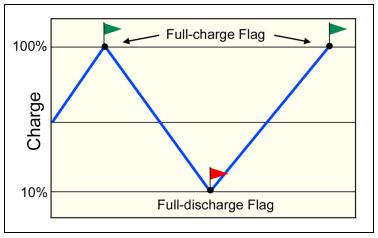
Smart-battery calibration is based on establishing anchor points. The battery management system needs a confirmed full-charge reference and a confirmed low or empty reference. Between these points, it estimates state of charge.
A typical calibration sequence is:
- Apply a full charge so the pack reaches its normal full-charge termination condition.
- Discharge the battery in the equipment until the device reports low battery.
- Recharge the battery fully.
The discharge portion sets the discharge reference flag. The full recharge establishes the charge reference flag. With both flags available, the gauge can form a more reliable relationship between the empty and full endpoints and estimate state of charge between them.
Source: Battery University

The discharge step should be understood as a controlled equipment discharge, not an abusive over-discharge. For lithium-ion equipment, the user should not attempt to force the pack below the device’s normal cutoff or protection limits. The purpose is to let the smart-battery system see a valid low-battery condition, not to drain cells beyond their safe operating range.
Once calibration is complete, the fuel gauge has better reference data. However, this improvement is not permanent. If the battery is again used mostly in shallow partial cycles, the learned line between full and empty can become less certain. Periodic recalibration may be needed where accurate runtime reporting is important.
Many smart batteries expose information through SMBus, the System Management Bus used by many battery packs and host devices. An SMBus smart battery can report values such as state of charge, voltage, current, capacity-related data, cycle information, and status flags. This information can be valuable for maintenance, but it can also be difficult for users to interpret because important values are mixed with many technical fields.
For practical battery assessment, full charge capacity, or FCC, is one of the most useful SMBus values. FCC represents the battery’s current usable capacity as learned by the smart-battery system. When compared with the original design capacity, FCC can provide an estimate of state of health.
For example, a new smart battery should have an FCC close to its design capacity. As the battery ages, the usable capacity declines, and FCC should decline accordingly if the gauge has learned the change. This makes FCC more informative than state of charge alone. State of charge tells how full the battery is relative to its present capacity; FCC helps indicate how large that present capacity is.
The distinction is important:
| Value | What it tells you | What it does not tell you by itself |
|---|---|---|
| State of charge | How full the battery is relative to its current usable capacity. | Whether the battery still has its original capacity. |
| Max Error | How confident the gauge is in its state-of-charge estimate. | Whether the cells are healthy or high capacity. |
| Full charge capacity | The learned usable capacity of the battery when full. | Whether the gauge is perfectly calibrated under all conditions. |
FCC can estimate state of health with reasonable accuracy, but it is still derived from the smart-battery system’s measurements and learned model. Its accuracy improves when the battery occasionally receives a full charge and a deeper discharge event that helps the gauge update its references. If the battery is used only sporadically or mostly within a narrow charge window, deliberate calibration may be needed from time to time to keep FCC and state-of-charge information useful.
A battery analyzer can improve confidence where maintenance decisions are important. Analyzer-based testing can apply controlled charge and discharge conditions and compare reported smart-battery data with measured usable capacity. This is especially helpful when a battery is being evaluated for service, replacement, or use in equipment where unexpected shutdown is unacceptable.
The best interpretation comes from combining the available data. A calibrated gauge with low Max Error supports reliable state-of-charge reporting. FCC compared with design capacity indicates how much usable capacity remains. Runtime behavior under the actual system load confirms whether the battery can perform the required job. None of these values alone gives a complete picture, but together they provide a practical basis for smart-battery maintenance.
Calibration therefore has a specific role: it keeps the digital fuel gauge synchronized with the battery’s real operating endpoints. It is a measurement-maintenance task, not a rejuvenation process. Used correctly, it reduces false runtime estimates, improves low-battery warning behavior, and makes SMBus capacity data more meaningful for service decisions.
References
- Battery University | BU-603: How to Calibrate a “Smart” Battery. (n.d.). http://www.batteryuniversity.com/article/bu-603-how-to-calibrate-a-smart-battery
- Battery University | BU-603: How to Calibrate a “Smart” Battery. (n.d.). https://www.batteryuniversity.com/article/bu-603-how-to-calibrate-a-smart-battery
- Smart Battery Calibration. (n.d.). https://www.rcgroups.com/forums/showatt.php?attachmentid=8165052&d=1439963763
- Batteryuniversity. (n.d.). https://batteryuniversity.com/learn/article/setting_performance_standards
- Battery University | BU-605: Testing and Calibrating Smart Batteries. (n.d.). https://www.batteryuniversity.com/article/bu-605-calibrating-smart-batteries-with-impedance-tracking
- How to Calibrate a Smart Battery for Accurate Readings. (n.d.). https://www.large-battery.com/blog/how-to-calibrate-a-smart-battery-for-accurate-readings
- BU-604: How to Process Data from a “Smart” Battery. (n.d.). https://batteryuniversity.com/article/bu-604-how-to-process-data-from-a-smart-battery
- Battery University | BU-605: Testing and Calibrating Smart Batteries. (n.d.). http://www.batteryuniversity.com/article/bu-605-calibrating-smart-batteries-with-impedance-tracking
- Learn About Batteries | Battery University. (n.d.). https://batteryuniversity.com/index.php/learn/article/setting_performance_standards
- Calibrating Smart Batteries with Impedance Tracking. (n.d.). https://incompliancemag.com/calibrating-smart-batteries-with-impedance-tracking